
On Wednesday, I attended the EdTechRVA Conference sponsored by the Virginia Society for Technology in Education (VSTE) at Virginia Commonwealth University in Richmond, VA. This was a new conference I recently discovered for the schools in the Greater Richmond area. While I’m slightly out of the area, it was still close enough for me to drive to and allow me to make connections with other educators. I had a great time and felt it was one of the best locally run conferences I’ve been to and came home with lots of ideas!
Here’s a bit of a round-up with some of the things I learned at the conference:
We started with the keynote session, “Explore – Collaborate – Create: Making #LifeReady Learners at The Creek” by teacher Jason Vest and principal Robbi Moose. They had one heck of an inspiring keynote describing the way they are doing things at Hungary Creek Middle School in Henrico County, VA. I’ll talk more about their Keynote in a separate post, because I was definitely inspired!
My first breakout session was “Adventures in Badging!“ with Kristine Vester where we learned about how to create a badging program for professional development. She uses a variety of tools to create her program at the two schools she works at. She starts out using the
badge tracking spreadsheet Flippity.net. I wish I would have known about this earlier because it would have been perfect for the Environmental Science class doing Gamification. We did our spreadsheet the old-fashioned way and figured out the formulas with trial and error.
Vester creates her badges by downloading icons from The Noun Project. She then imports it to Google Drawings and changes the icon to white because she has a dark background. She then downloads this as jpg. To make the final part of her badge, she imports the jpg to Online Badge Maker, adds a background and changes the scale , then saves it to the computer. She goes back to the Drawings file, where she deletes the icon and inserts the downloaded images from Badge Maker to the canvas, resizes the canvas and publishes it to the web. She copies and pastes the URL to the spreadsheet, so that when teachers submit their work, they can receive their badge and she can track it.
I really like this idea with the tracking system, but the explanation of her activities were what really caught my attention. Vester does a monthly training with different technologies and shows teachers different ideas and then creates a Google Doc with activities for various badge levels. Here’s an example of her Color By Number badge. I think it’s a wise idea to have various badge levels for teachers who are at different learning levels. This is something I could see incorporating next year.
The next session I attended was “Critical Thinking – Making Anywhere, Anytime Learning a Student Habit“ with Ann Nash. She broke critical thinking down into good understandable chunks that I appreciated. It starts with 3 parts:
- Reasoning
- Making Judgments/Decisions
- Problem-solving
Reasoning includes asking effective questions through an app such as Pear Deck or Nearpod, having authentic communication activities completed through Adobe Spark or Google Slides, or even Scratch. I was especially interested in learning more about how they use Scratch and will probably talk more with our STEM teachers about this. Finally it’s also making
connections, whether it’s cross-curricular or something in students’ lives too! What problems do they need to solve? Is there something going on in their neighborhood that connects with what their learning?
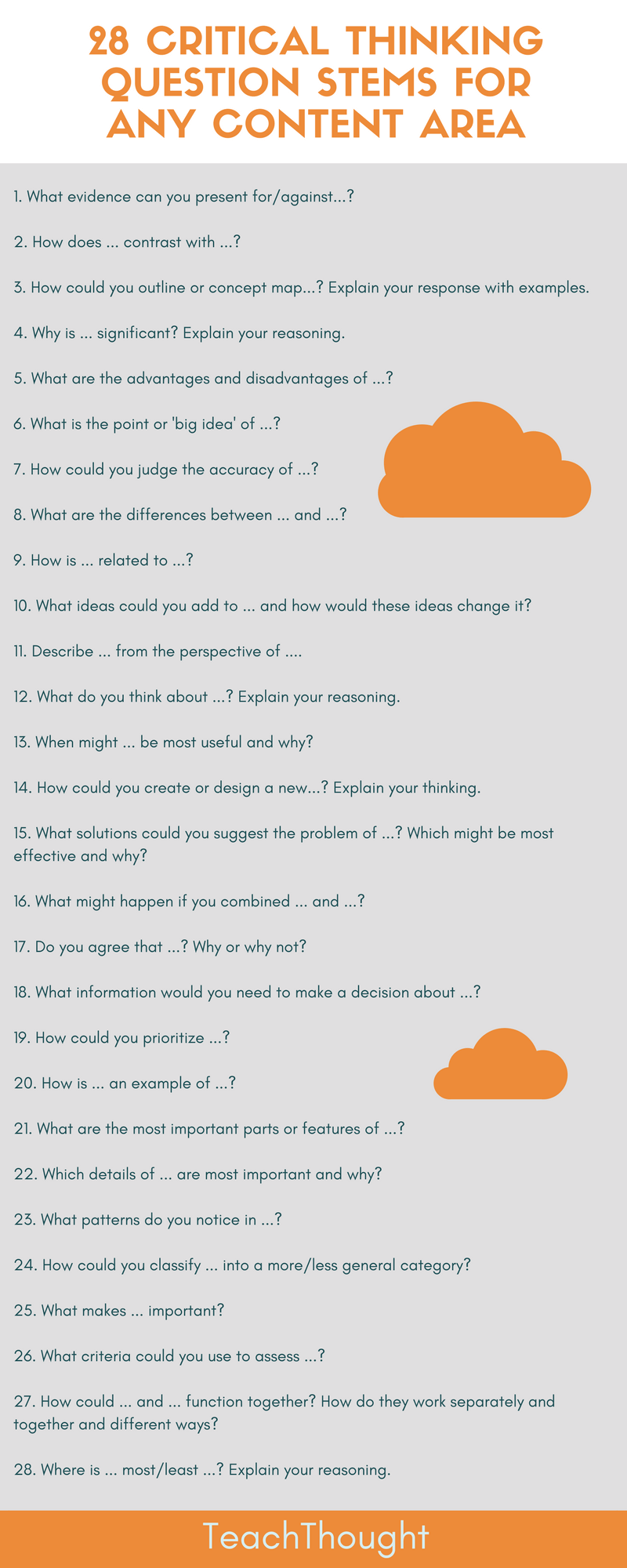
Making Judgments/Decisions should include open-ended questions making students think deeper! She had a link in her presentation to 28 Critical Thinking Question Stems for any Content Area and also showed an Edutopia video illustrating 60-Second Strategy Participation Cards. I will definitely need to check into both of these a little more.
She also emphasized that analyzing data and patterns will help students to make judgments and shared these resources for data:

Problem Solving should focus on authentic questions and asking students about problems they see in their own communities. Nash shared that she uses The Global Goals for Sustainable Development, which I was not familiar with, and uses many of the lesson activities contained within the various topics with the classes she works with.
Nash shared strategies that she uses for problem solving, such as The Launch Cycle, which is part of the Design Thinking framework and RED – which stands for Recognize assumptions, Evaluate arguments, and Draw conclusions, is also good for helping students evaluate their media consumption. Henrico’s public STEAM website has other resources to help you find a design cycle that fits for you and your students. Here’s the direct link to those resources.
Finally, Nash emphasized the importance of building curiosity into lessons. Her strategy is to
create and share playlists of many resource types to give to students. Playlists can be created in a variety of tools such as Canvas, Google Docs/Slides/Sites, or YouTube and include videos, articles, blogs, podcasts, your own notes or audio/video files. This can also help to teach students how to evaluate resources. Or let students create their own banks of resources to share with the classes by submitting resources on a Google form. Students will learn to give credit for good sources and include summaries. Here’s a sample of the form Nash uses.
As I sat through the session it made me pause to wonder, “Do we as teachers really think about what critical thinking is and what all it entails?” “How do we build critical thinking into our lesson design?”
It is noted in the article, “Teacher Perceptions of Critical Thinking Among Students and its Influence on Higher Education” that:
Students need to be taught how to think more effectively, that is more critically, coherently, and creatively. For example, teachers could provide students with the criteria for judging information and taught the terms and strategies used for critical thinking (qtd. in Choy and Cheah).
The strategies Nash shared would definitely help students to think more critically and could be added to any type of activity, online or off. If nothing else, it’s a great place to start if you’re looking to add more critical thinking skills into your lessons.
I’ll talk more about the Keynote and the last session I attended in my next post.
 Ms Priester EDU